

Introduction
Somewhere in every organization there's a .mdb file from 2005 that still holds data someone needs — and nobody has Microsoft Access anymore. This post cracks one open with aux4/mdb (no Access, no Windows, no ODBC), reshapes it with aux4/adapter, and loads it into SQLite so the data is finally queryable with modern tools.
We'll use inventory.mdb, a legacy products database. Bring your own .mdb and the same steps apply; the aux4/mdb package also ships a sample.mdb if you just want to experiment.
Install the packages
aux4 aux4 pkger install aux4/mdb aux4/adapter aux4/db-sqlite aux4/2table aux4/chart
Step 1: see what's inside
You can't open the file in Access, so start by listing its tables and row counts:
aux4 mdb tables --file inventory.mdb --showCount true
[
  { "name": "Products", "rowCount": 15 }
]
One table, 15 rows. Inspect its schema — column names and Access types — with describe:
aux4 mdb describe --file inventory.mdb --table Products
{
  "name": "Products",
  "rowCount": 15,
  "columns": [
    { "name": "ProductID", "type": "long", "size": 4, "nullable": true },
    { "name": "ProductName", "type": "text", "size": 510, "nullable": true },
    { "name": "Category", "type": "text", "size": 510, "nullable": true },
    { "name": "UnitPrice", "type": "double", "size": 8, "nullable": true },
    { "name": "UnitsInStock", "type": "integer", "size": 2, "nullable": true },
    { "name": "Discontinued", "type": "boolean", "size": 0, "nullable": true },
    { "name": "AddedOn", "type": "datetime", "size": 8, "nullable": true }
  ]
}
Classic Access naming — PascalCase columns, a boolean Discontinued flag, a datetime.
Step 2: read the rows
aux4 mdb data extracts rows as a JSON array. The keys are the Access column names exactly:
aux4 mdb data --file inventory.mdb --table Products --limit 3
[
  {
    "ProductID": 1,
    "ProductName": "Chai",
    "Category": "Beverages",
    "UnitPrice": 18,
    "UnitsInStock": 39,
    "Discontinued": false,
    "AddedOn": "2003-04-15T00:00:00.000Z"
  },
  {
    "ProductID": 2,
    "ProductName": "Chang",
    "Category": "Beverages",
    "UnitPrice": 19,
    "UnitsInStock": 17,
    "Discontinued": false,
    "AddedOn": "2003-04-15T00:00:00.000Z"
  },
  {
    "ProductID": 3,
    "ProductName": "Aniseed Syrup",
    "Category": "Condiments",
    "UnitPrice": 10,
    "UnitsInStock": 13,
    "Discontinued": false,
    "AddedOn": "2003-06-01T00:00:00.000Z"
  }
]
For large tables, aux4 mdb stream emits one JSON object per line (NDJSON) instead of building one big array:
aux4 mdb stream --file inventory.mdb --table Products | head -2
{"ProductID":1,"ProductName":"Chai","Category":"Beverages","UnitPrice":18,"UnitsInStock":39,"Discontinued":false,"AddedOn":"2003-04-15T00:00:00.000Z"}
{"ProductID":2,"ProductName":"Chang","Category":"Beverages","UnitPrice":19,"UnitsInStock":17,"Discontinued":false,"AddedOn":"2003-04-15T00:00:00.000Z"}
Step 3: modernize the shape
Rather than carry PascalCase columns forward, reshape the records with aux4/adapter — rename fields to clean names and fix one thing SQLite is picky about. Create config.yaml:
config:
  product:
    format: json
    mapping:
      id: $.ProductID
      name: $.ProductName
      category: $.Category
      price: $.UnitPrice
      stock: $.UnitsInStock
      discontinued:
        expr: "Discontinued ? 1 : 0"
      added_on: $.AddedOn
Each $.Field renames a column. The expr on discontinued is the important one: SQLite's binder can't take a JSON true/false, so this JSONata expression turns the Access boolean into 1/0. Run the reshape:
aux4 mdb data --file inventory.mdb --table Products | aux4 adapter map --configFile config.yaml --config product
[
  {
    "id": 1,
    "name": "Chai",
    "category": "Beverages",
    "price": 18,
    "stock": 39,
    "discontinued": 0,
    "added_on": "2003-04-15T00:00:00.000Z"
  }
]
Clean snake_case columns, and discontinued is now an integer SQLite will accept.
Step 4: load it into SQLite
Create the destination table, then run the whole pipeline into it. --inputStream reads records from stdin and fills the :name placeholders:
aux4 db sqlite execute --database inventory.db \
  --query "CREATE TABLE products (id INTEGER PRIMARY KEY, name TEXT, category TEXT, price REAL, stock INTEGER, discontinued INTEGER, added_on TEXT)"

aux4 mdb data --file inventory.mdb --table Products \
  | aux4 adapter map --configFile config.yaml --config product \
  | aux4 db sqlite execute --database inventory.db \
      --query "INSERT INTO products (id,name,category,price,stock,discontinued,added_on)
               VALUES (:id,:name,:category,:price,:stock,:discontinued,:added_on)" --inputStream
{ "success": true, "count": 15 }
Fifteen rows that lived in a binary Access file are now in a SQLite table.
Step 5: report on data you couldn't query before
It's ordinary SQL now. Which products are discontinued?
aux4 db sqlite execute --database inventory.db --query \
  "SELECT name, category, price FROM products WHERE discontinued = 1" \
  | aux4 2table name,category,price
 name             category  price
 Mishi Kobe Niku  Meat         97
 Alice Mutton     Meat         39
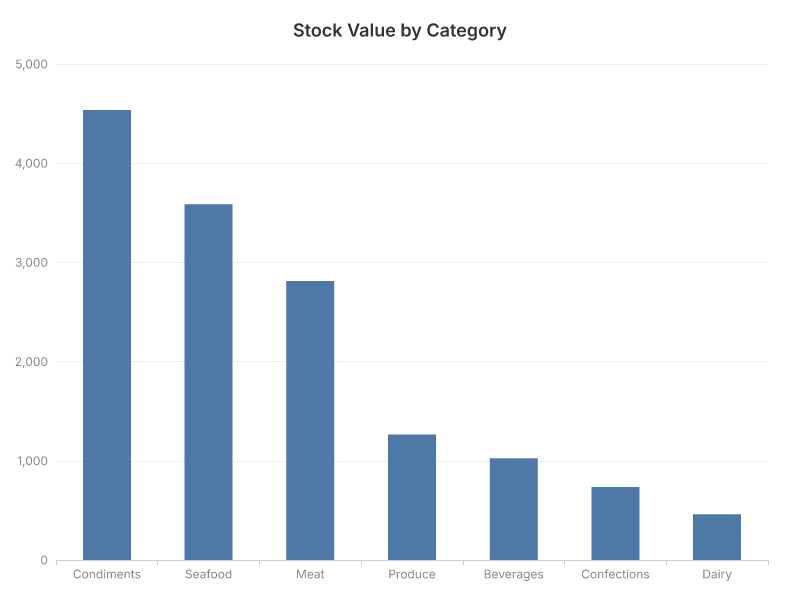
Where is the money tied up in stock? Sum price * stock per category:
aux4 db sqlite execute --database inventory.db --query \
  "SELECT category, SUM(price*stock) AS stock_value, COUNT(*) AS items
   FROM products GROUP BY category ORDER BY stock_value DESC" \
  | aux4 2table category,stock_value,items
 category     stock_value  items
 Condiments          4536      4
 Seafood             3586      2
 Meat                2813      2
 Produce          1263.75      2
 Beverages           1025      2
 Confections       736.05      2
 Dairy                462      1
And because it's just a JSON array, the same query pipes straight into aux4 chart for a picture:
aux4 db sqlite execute --database inventory.db --query \
  "SELECT category, SUM(price*stock) AS stock_value FROM products
   GROUP BY category ORDER BY stock_value DESC" \
  | aux4 chart bar --x category --y stock_value --title "Stock Value by Category" --output stock-value-by-category.png
Conclusion
A .mdb file nobody could open is now a queryable SQLite table and a chart — without installing Microsoft Access. aux4/mdb reads the legacy file, aux4/adapter modernizes the column names and coerces the boolean SQLite rejects, and aux4/db-sqlite gives the data a second life you can query, join, and visualize.